

In 2025 Quanda gained eight major new features: a new generation of surveys with 22 question types, an overview of all sent emails in one place, sending campaigns and personalizing the entire email content via API, prefilling survey answers, a Pipedrive integration and an extended Raynet integration, the first projects in Quanda HUB and a new generation of forms. For each one you will learn what it does, where to find it in Quanda and how to put it to use.
In brief
- Surveys have new templates, a design editor, clearer answer analysis and 22 question types, 7 of them new.
- The Sent emails overview shows what was sent, when and to whom over the last 30 days.
- You can now create and send an entire email campaign via API.
- Via API you personalize not just the greeting, but also headings, text, images and links.
- You can prefill survey answers for respondents via API.
- Quanda integrates directly with Pipedrive CRM and, in an extended form, with Raynet CRM.
- Quanda HUB triggers communication on its own based on data from your CRM, ERP or DMS.
- The new generation of forms brings design freedom and full responsiveness.
In brief: what is new, since when, who it concerns and where to switch it on
- What is new: a new generation of surveys, an overview of sent emails, campaigns and personalization via API, prefilled answers, Pipedrive and Raynet integrations, Quanda HUB and a new generation of forms.
- Since when: everything except the new forms is available in Quanda right now, the new forms are arriving gradually.
- Who it concerns: every Quanda user; the integrations and the API are most useful for companies with their own CRM, ERP or DMS and their developers.
- Where to switch it on: surveys and the email overview directly in the app, CRM integrations in Settings > Extensions & Integrations, the API key in Settings > API keys, Quanda HUB after talking to us.
What has changed since this article was published: Quanda HUB now has its own page with a real-world example from the car dealer CARLING AUTO, and it is now also connected with BlueJet CRM. The list of personalization tags for this integration is in the guide Personalization tags for the BlueJet CRM and Quanda HUB integration.
1. A new generation of surveys
A big effort from several members of our team has produced completely new surveys in Quanda. Faster and simpler survey building, a more modern look that matches your brand exactly, new question types and even more convenient work with results.
- New templates and a design editor
- Easier creation and editing of questions
- 7 new question types
- Clearer answer analysis
- An extended API for surveys
Templates and the design editor. As soon as you start building a survey, new templates are ready for you. Use them for inspiration, or design the look from scratch in the design editor, which you open with the palette icon on the Survey page. It lets you set fonts, colours and sizes of all texts, the background of the whole survey and of individual pages (a colour, a gradient or an image), the colours of radio buttons and checkboxes, the submit button, your own logo and question numbering. Save the finished look as your own template and reuse it next time with a single click.

New question types. Quanda now offers 22 question types in total. The new ones are Satisfaction scale, Agreement scale, Star rating, Smiley rating, Percentage scale and the brand new Attitude scale. The seventh addition is a personal details question, which you put together from the contact fields and which saves the new contact straight into Quanda. We have also updated most of the original questions. For a Multiple answers question, for example, you can now set the maximum number of options a respondent may tick.
Clearer answer analysis. In the analysis you can expand or collapse all questions at once, individual pages or just a single question. When new answers come in, the results update on their own as soon as you open the page.
All of this is available in Quanda now. You will find a detailed description in the article The new generation of surveys in Quanda and an overview of every question type in the guide Building a survey: question types.

Tip: Don't want to start from a blank page? The Questionnaire library offers professionally prepared survey templates, including invitations. Each one is ready for you inside Quanda, so you can use the survey straight away.
2. All sent emails in one place
In the Statistics & Analytics section of Quanda you will now find a new category called Sent emails overview. It gives you a complete overview of every email you have sent in the last 30 days. You can search by email address (a specific client, for example) or by subject line.
A quick and easy way to check what was sent, when and to whom, including opens and clicks across all campaign types.
 Jan SpáčilCEO Quanda
For each email you see the recipient's name and address, the campaign name, the subject line and the time it was sent, delivered or bounced, opened and clicked.

Tip: When a client calls to say an email never arrived, type their address into the filter. Within seconds you know whether the email was sent, whether it was delivered and whether they opened it. If there is a time in the bounced column, check that you have the client's address right.
3. Sending email campaigns via API
You can now create and send a simple email campaign entirely through the API. If you need to send a single email in response to a particular event, use transactional emails, which can also be sent via API. If you want to reach a larger number of recipients with one campaign, the new API lets you create the campaign, manage the recipient list, edit the content, send test emails and send the whole campaign.
Which option should you choose? It depends on how many people you are reaching and what triggers the send:
| What you need | Solution in Quanda |
|---|---|
| Send one email in response to an event, such as a sign-up or an order | Transactional email via API |
| Send one campaign to many recipients directly from your own system | Email campaign via API |
| Send emails automatically based on scenarios built on CRM, ERP or DMS data | Quanda HUB |
| Transfer contacts from Pipedrive or Raynet into Quanda | CRM integration in Settings |
The technical steps are in our API documentation. To sign in via API you need an API key, which you create in Settings > API keys. See the guide API documentation and API key.
4. Full email content personalization via API
If you create and send campaigns via API, you get new personalization options. Personalization no longer has to stop at the greeting. It can cover every other part of the email too. You can personalize, for example:
- Headings
- Text and parts of it
- Images
- Links on images, buttons or text
In the email template you use tags instead of fixed content and send the content for each recipient through the API. One template can then carry a different heading, a different product image and a different button link for every recipient.

5. Prefilling survey answers via API
When you send a survey invitation email via API, you can prefill some of the answers for the respondent. If, for example, you want the respondent to rate a specific product or service, you can fill in its name, the date of sale or other details in the survey. The respondent immediately sees what they are rating without having to look up and enter that information.
Tip: Every extra question lowers the number of completed surveys. So don't ask respondents to fill in details you already have in your system (the car model, the order number, the visit date). Prefill them instead. The survey gets shorter and you can match the answers to a specific order.
6. More CRM integrations
In 2025 we added a full integration with Pipedrive CRM. In Quanda, under Settings > Extensions & Integrations, you will find the options for setting up this connection, including the data and information that can flow between Pipedrive and Quanda.
The same section now also offers an extended integration with Raynet CRM, again with options for the data being transferred. How to connect Quanda with Raynet and export contacts from it, tags included, is described in the guide Connecting Quanda and RAYNET CRM and exporting contacts. If you don't have the integration active yet and would like to try it, get in touch and we will gladly help you set it up.
CRM integrations currently available

Using a different CRM? Through Quanda HUB we can connect systems that have no direct integration (see the next section), and you can connect any system with Quanda yourself via API. See the guide Connect Quanda with your website, CRM or other software holding your contacts.
7. Quanda HUB
A major milestone was the launch of the first projects in Quanda HUB. Quanda HUB is a unique integration and automation platform that can connect to your CRM, ERP or any other system where you keep data about customers, orders and sales. On top of that data, Quanda HUB lets you build and run automations that send emails, surveys and notifications. It also lets you use the data to personalize emails down to the last detail.
Imagine a customer has bought a specific product that goes with another product or service. Or it is their first purchase in a given category. Or they haven't bought anything for 3 months. Or their next appointment with you is coming up. You set up scenarios, add the conditions that have to be met, and Quanda evaluates everything automatically and sends the email once the conditions are met. The result is highly targeted, personalized communication. The possibilities are almost endless: it all depends on your industry, the data you have and how you prefer to communicate.
Quanda HUB handles tasks that can't be done by hand, that would take far too much effort, or that nobody wants to do by hand.
Jan SpáčilCEO QuandaAn example of the interface customers use to build automation scenarios for the integrated Caris DMS application.
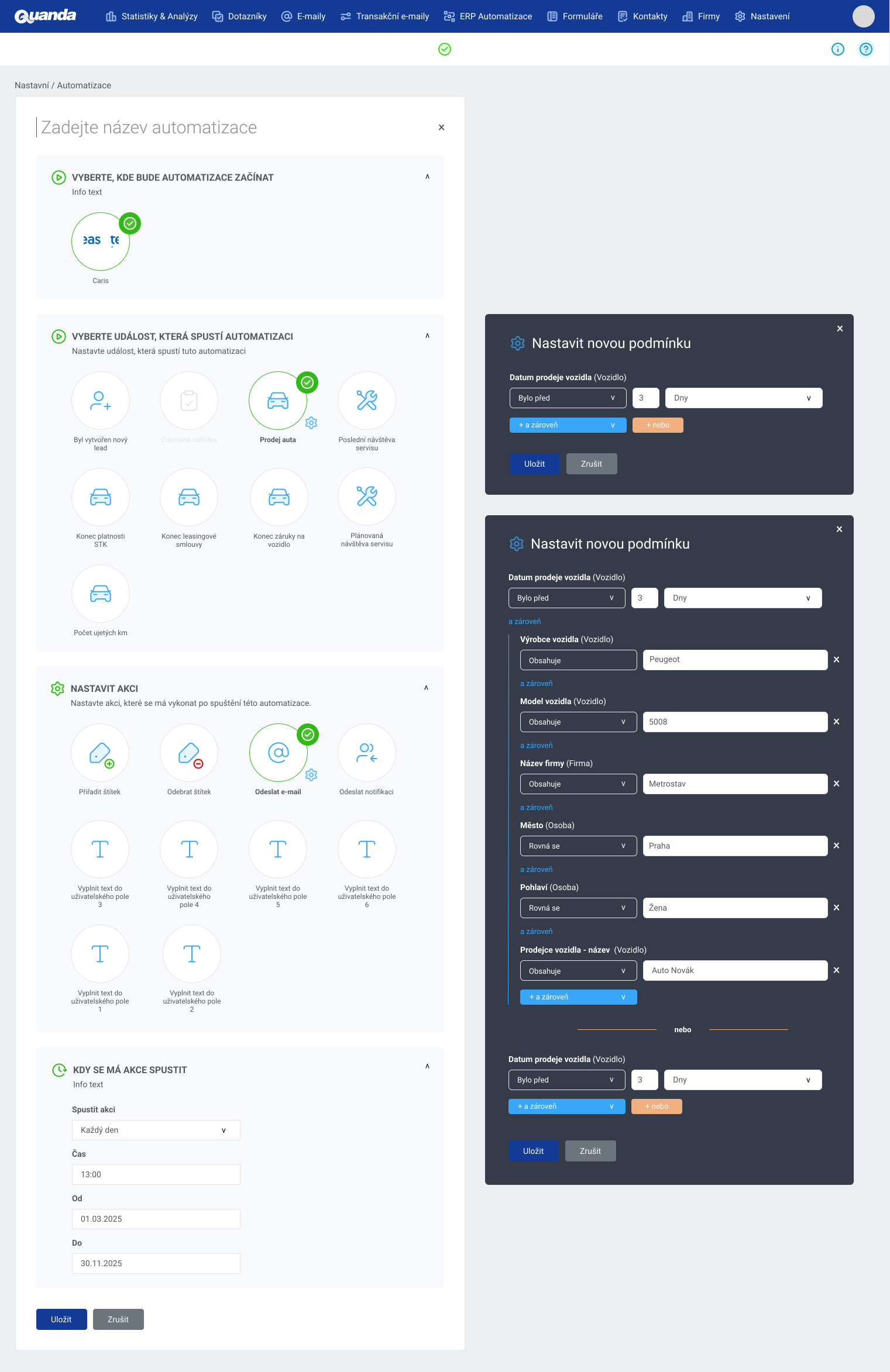
Real-world example: CARLING AUTO. This Citroën dealer and service centre connected Caris DMS with Quanda HUB. Its communication is triggered by seven types of vehicle events: the sale date, the last service visit, the technical inspection expiry, the end of financing, the end of warranty, the next planned service visit and the mileage. 75 active scenarios are evaluated every day, the post-sale scenario alone has 8 scheduled messages, and care for a single customer runs for 7 years. Marketing no longer steps into the scenarios. It only adds content for the individual models. You will find the full case on the Quanda HUB page.
Automatic email personalization based on real data
Once Quanda is connected to your CRM, ERP or any other system you use, that information can drive not only automated sending and targeting, but also detailed personalization of the content. A car dealer and service centre, for example, can send customers reminders about service checks, the end of financing or the technical inspection deadline, accessory offers or news about their specific car model.

Which customer and vehicle details you can insert into an email is shown in the guide Personalization tags for the Caris DMS and Quanda HUB integration. How to turn the data in a dealer system into repeat purchases is covered in the article How car dealers can turn customer data into repeat business.
8. A new generation of forms in Quanda
The last update we want to introduce is the new generation of forms, which is steadily making its way into Quanda. The new forms will give you complete creative freedom: you will be able to play with the design, images, backgrounds and the layering of individual elements. The forms will be fully responsive and let you optimize how they look on both desktop and mobile devices.
We can't wait to make this feature fully available so you can build forms exactly the way you imagine them and collect new contacts! Until then, active forms collect new contacts on your website, including automations that tag contacts and send a confirmation email.
What to try in Quanda right now
- Open the Sent emails overview in Statistics & Analytics and search for the address of your most important client.
- Try a Star rating or Smiley rating question in a survey and save the look as your own template.
- Pick a template in the Questionnaire library that matches what you need to find out from your customers.
- Check in Settings > Extensions & Integrations whether your CRM is connected.
- Create an API key and pass it to your developers together with a link to the API documentation.
- List the events in your CRM or ERP that customer communication should follow. That is your brief for Quanda HUB.
In closing
Thank you for being with us. We are looking forward to what we will achieve together in 2026! If one of these updates caught your eye and you are not sure how best to use it, book a free consultation. Our support team is also happy to help with any setting or feature at support@onquanda.com or on +420 605 163 892.
The Quanda team


